Newsletter Subscribe
Enter your email address below and subscribe to our newsletter

Enter your email address below and subscribe to our newsletter
Imagine this scenario: It is the year 2045. You have peacefully departed for that Great Cloud in the Sky (which hopefully has better storage limits than iCloud). Down here on Earth, your niece is scrolling through her phone when ping!—a notification pops up.
It’s you. You’ve just invited her to play “Candy Crush Saga Level 4,000.”
Or worse, your LinkedIn profile is still diligently congratulating people on their work anniversaries, making everyone wonder if the Wi-Fi in the afterlife is really that good.
If that sounds like the plot of a low-budget sci-fi comedy, you aren’t far off. But it is also a very real digital reality. We spend decades building our online lives—sharing photos of grandkids, arguing about politics with high school acquaintances we haven’t seen since the Carter administration, and curating email folders full of casserole recipes. Yet, research shows that over 90% of us have absolutely no plan for what happens to all that digital stuff when we log off for the last time.
Leaving your digital life unattended isn’t just spooky; it’s a burden on the people you leave behind. It turns your loved ones into digital detectives trying to guess passwords while grieving. The good news? You don’t need a law degree or a ghostly medium to fix this. You just need a few settings, a cup of coffee, and a plan.
We all know we should organize our physical papers so our kids don’t have to sift through forty years of tax returns. Your digital life requires the same courtesy.
According to recent data, 61% of consumers worry about identity theft risks involving deceased people’s accounts. That is a valid fear. A dormant account is a playground for hackers who realize no one is watching the gate.
But beyond security, there is the emotional aspect. Do you want your Facebook page to become a memorial where friends share memories? Or would you prefer to simply delete your account and vanish into the digital mist? There is no wrong answer, but there is a wrong method: doing nothing and hoping Mark Zuckerberg figures it out for you.
Trying to tackle every account you have ever opened is a recipe for a migraine. You likely have accounts on websites that haven’t existed since the days of dial-up. Ignore those for a moment.
Focus on the “Big Three” of your digital identity: Social Media, Email, and Professional Networks. These are the public-facing billboards of your life.
Below is a comparison to help you decide which beast to tame first.
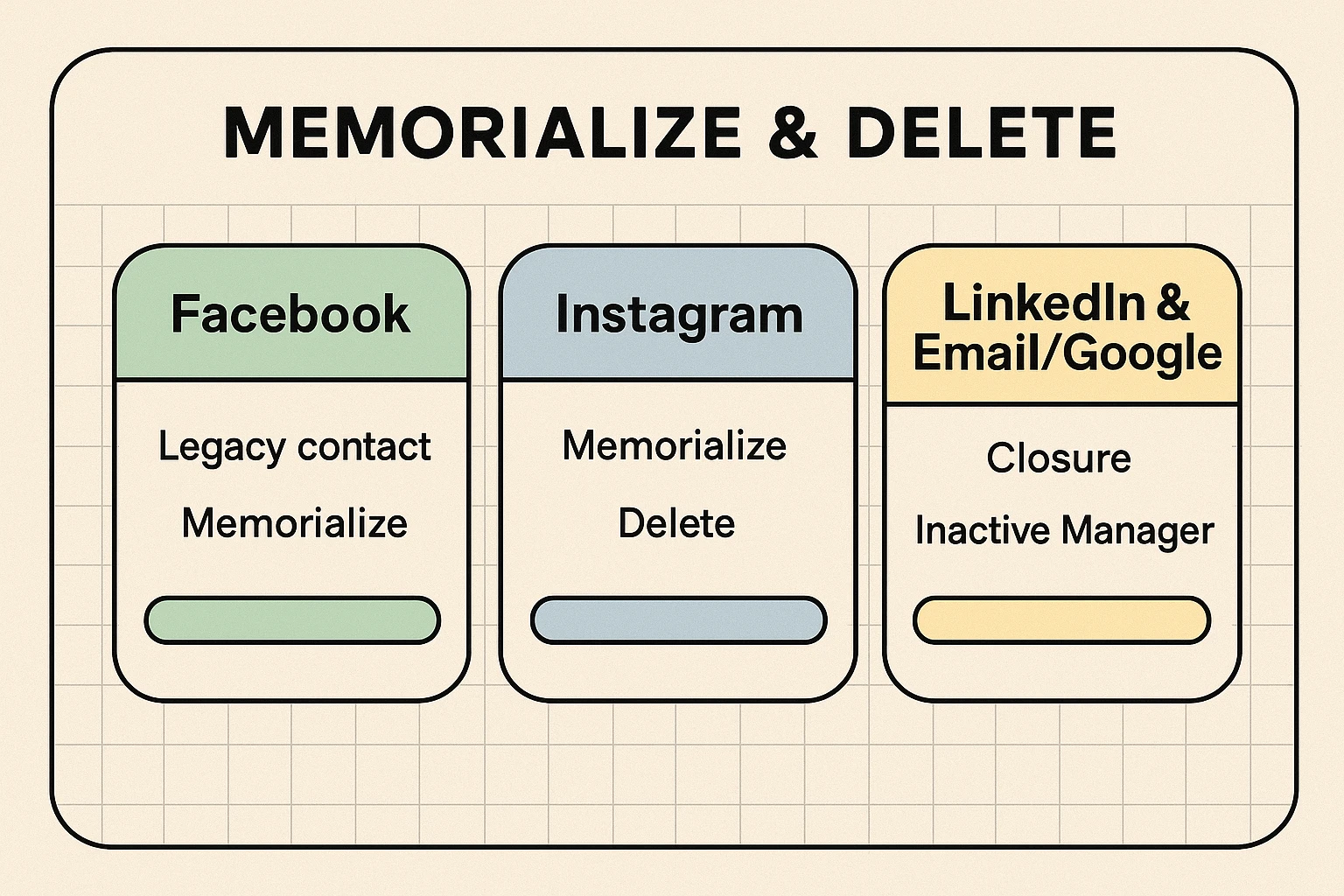
For most of us, Facebook is the digital living room. It’s where the photos reside. Facebook offers the most robust tools for the afterlife, specifically something called a Legacy Contact.
Think of a Legacy Contact as a digital executor, but with very limited powers. They can’t read your private messages (so your secrets are safe). They can’t delete friends or post as you.
What they can do is pin a final tribute post to your profile, update your profile picture, and respond to new friend requests (likely from family members connecting for memories).
Pro Tip: Tell this person you picked them! Do not let them find out via a notification while they are eating breakfast. That is a startling way to start a Tuesday.
While Facebook wants to keep the party going, other platforms are a bit more transactional.
Instagram is owned by Meta (Facebook’s parent company), so the process is similar. You can choose to have your account memorialized—meaning the word “Remembering” sits next to your name, and your photos stay up. However, unlike Facebook, you cannot currently appoint a specific Legacy Contact to manage the page actively within the app settings as easily. It usually requires your next of kin to provide proof of death to Instagram later.
LinkedIn is a different beast. Unless you plan on ghost-consulting from the great beyond, you probably want this account closed. There is rarely a need for a memorialized professional profile. LinkedIn allows a verified family member to request the removal of the profile. Your best bet? Include your login info in a secure password manager (more on that in a moment) so your executor can simply log in and hit “Close Account.”
Your email is the master key. It resets passwords for every other account. If your family can access your email, they can handle almost anything else.
Google has a brilliant feature called the Inactive Account Manager. It’s essentially a dead man’s switch. You tell Google: “If I haven’t logged in for 3 months, assume I am either on a very long cruise or I have expired.”
At that point, Google can automatically send an email to a trusted contact. You can even write the email now. It could say, “Here is the password to the laptop,” or “Please delete my browser history immediately and ask no questions.”
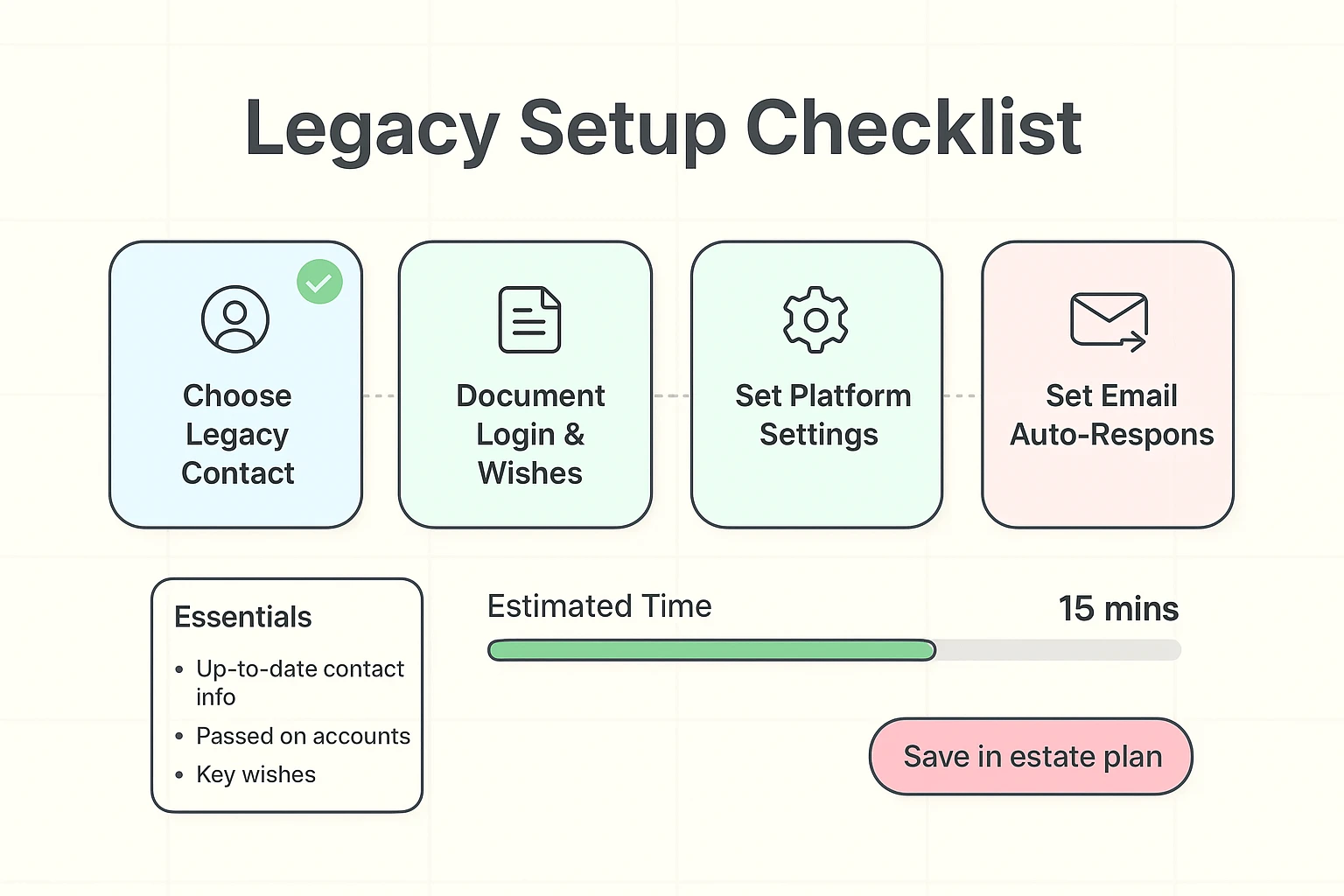
Here is the tricky part that lawyers love to charge money to explain: Your traditional Last Will and Testament might not cover your Facebook account.
Most tech companies have Terms of Service that say, “We don’t care who your executor is; you agreed to our rules.” This is why using the tools inside the apps (like the Legacy Contact) is vital. It tells the company you authorized this person, bypassing a lot of legal red tape.
However, you should still list your digital assets in your estate planning. Just don’t put passwords directly in your Will, because Wills become public records after probate. Unless you want the general public logging into your Amazon account, keep the passwords in a separate, secure document or a password manager.
You can, but passwords change. If you change your Facebook password six months from now and forget to tell your daughter, that sticky note you gave her is useless. Plus, sharing passwords technically violates the Terms of Service of most platforms, which gives them an excuse to lock the account if they detect “unusual activity” (like a login from a new location after you’re gone).
They keep charging you! Until the credit card is canceled or the account is closed, the meter runs. This is why having access to your email is crucial—it’s where the receipt notifications land.
This sounds like science fiction, but 58% of people agree an online presence could be recreated via AI. Currently, there are services that promise to create “chatbots” based on your texts, but the major platforms (Facebook/Google) don’t do this automatically. If you don’t want a robot version of yourself selling crypto in 2050, setting your accounts to “Delete” rather than “Memorialize” is the safest bet.
Talking about the end of the road isn’t exactly party conversation. But taking thirty minutes to set up a Legacy Contact or Google’s Inactive Account Manager is a gift to your family. It saves them hours of frustration and phone calls to customer service robots.
You’ve spent a lifetime curating your reputation. Don’t let a lack of planning let the algorithms decide your legacy. Take control, set the settings, and then go enjoy your (offline) day.