Newsletter Subscribe
Enter your email address below and subscribe to our newsletter


Remember shoeboxes? Those cardboard coffins under the bed, overflowing with blurry photos of your cousin’s wedding, a picture of a thumb, and that one perfect shot from vacation in 1987? You swore you’d organize them one day. Well, congratulations! You’ve upgraded. Now you have a digital shoebox, except it’s scattered across your phone, your computer, three old laptops, and a mysterious place in the sky called “The Cloud.”
Trying to find a specific photo feels like searching for a particular grain of sand on a very, very large beach. You know you have that adorable picture of little Timmy covered in spaghetti, but was it on your old phone from 2016? Or did you email it to yourself? After 20 minutes of clicking, you give up and decide it’s easier to just invite Timmy over and recreate the spaghetti incident from scratch.
If this digital chaos sounds familiar, you’re not alone. The good news is there’s a new sheriff in town, and its name is Artificial Intelligence (AI). Before you run for the hills picturing a robot from a sci-fi movie taking over your family album, let’s get one thing straight: AI is not here to judge your photography skills. It’s here to be your tireless, unpaid intern, ready to sort through decades of digital memories faster than you can say “cheese.”
Think of AI as a super-smart assistant who never gets bored or needs a coffee break. It “looks” at your photos using a few clever tricks that turn your digital mess into a tidy, searchable library. It’s not magic, but it sure feels like it.
Here’s the simple version of what’s happening under the hood:
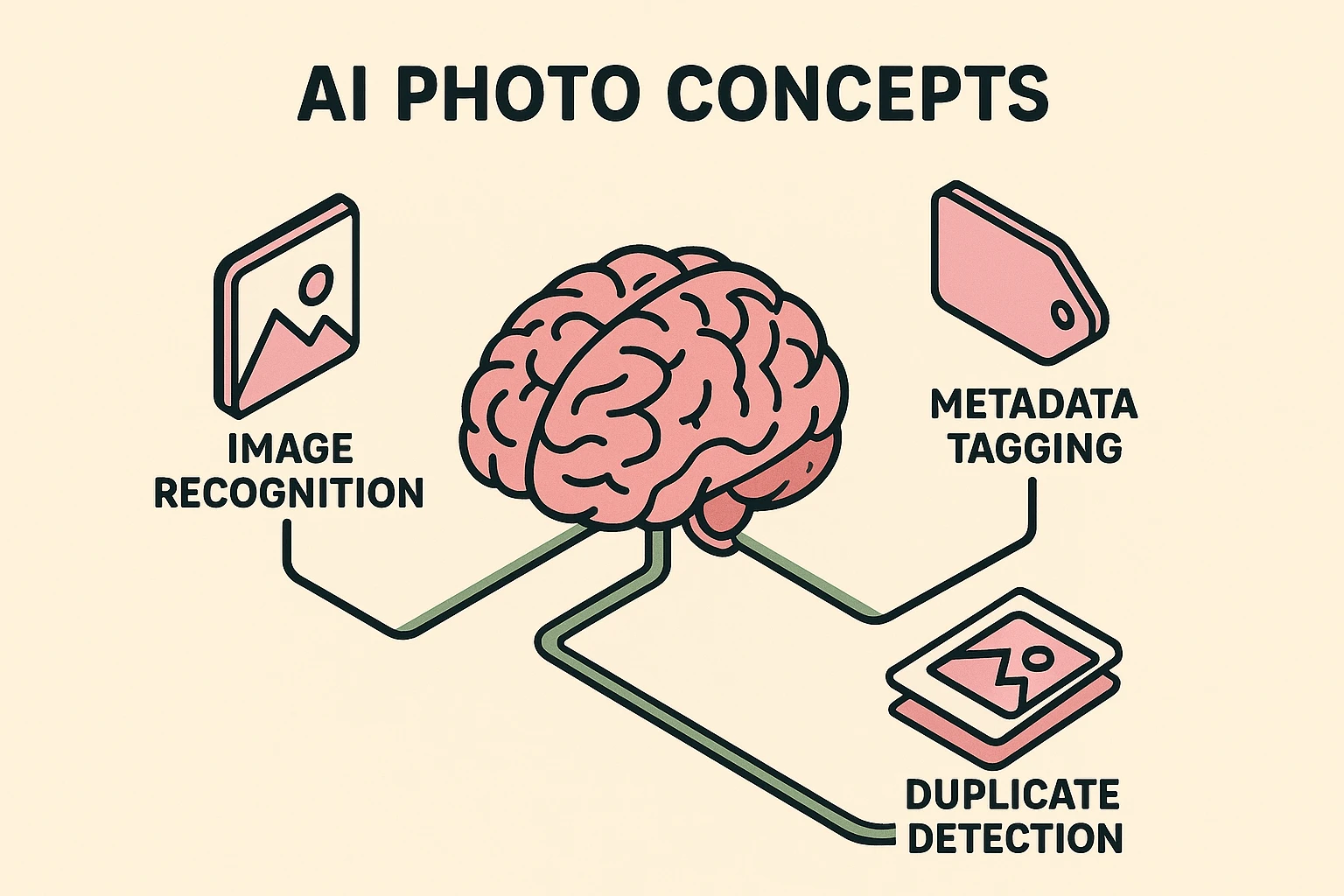
Image Recognition: This is the AI’s superpower. It can identify objects, faces, and places in your pictures. It’s like teaching a toddler to point at every dog in a picture book, except this toddler has a Ph.D. and has seen every photo of a dog on the entire internet. It can tell the difference between a picture of your cat, Fluffy, and a picture of your grandson’s birthday party.
Automated Tagging: Once the AI recognizes what’s in a photo, it acts like a super-fast librarian, attaching little digital labels (or “tags”) to it. It might add tags like #beach, #summer, #sunset, or even the names of people it recognizes. This means you can later search for “beach” and find every vacation photo without having to remember the year you took it.
Duplicate Detection: This is the real clutter-buster. The AI scans your collection for identical or nearly identical pictures. You know, those 12 photos you took of a seagull trying to steal your fries, each one just a tiny bit different? The AI finds them all, shows them to you, and lets you keep the best one while tossing the rest.
Alright, enough theory. Let’s roll up our sleeves and put your new AI intern to work. Following a simple plan can take you from feeling overwhelmed to feeling like the master of your digital domain.
Before you can organize anything, you need it all in one place. This is like getting all your junk mail into one big pile before you start sorting. Copy the photos from your phone, old computers, and USB drives into a single master folder on your main computer.
Once your photos are corralled, it’s time to unleash the AI. Choose an AI photo organizer tool (we’ll get to that in a minute) and tell it to hunt for duplicates. It will present you with groups of identical shots, making it easy to say “goodbye” to the clutter.
This is where the magic really happens. Let the software scan your entire library. It will start tagging photos with keywords like “park,” “Christmas,” or “mountains” and identifying the faces of recurring people. This step might take a while, so feel free to go have a cup of coffee. Your intern is on the job.
The AI is smart, but it’s not perfect. It might tag a picture of your bald Uncle Larry as an “egg.” This is your chance to play editor. Quickly review the AI’s work, correct any silly mistakes, and confirm the names of people. You have the final say.
To prevent the digital shoebox from overflowing again, create a simple habit. Once a month, move new photos from your phone to your master folder and let the AI quickly sort and tag them. It only takes a few minutes and will save you hours of searching later.
When people hear “AI,” they often have a lot of questions—and a healthy dose of suspicion. Let’s tackle some of the biggest myths right now.
Myth: The AI is always 100% correct.
Reality: Think of the AI as a very eager but sometimes confused assistant. It’s incredibly good at finding patterns, but it doesn’t have your life experience. It might not understand that the blurry photo of a half-eaten cake is precious because it was from your 50th anniversary. The AI makes suggestions, but you are the final curator of your memories.
Myth: Using an AI tool means my private photos will be all over the internet.
Reality: This is a huge concern, and it’s a valid one. Many reputable AI photo organizers run directly on your computer, meaning your photos never leave your device. For cloud-based services, it’s crucial to read their privacy policy. A trustworthy company will be crystal clear about how they handle your data. We’ll help you spot the good ones.
Myth: This high-tech stuff is probably expensive.
Reality: While some professional-grade tools have a price tag, many excellent AI organizers are surprisingly affordable or even have free versions. Plus, think of the cost of your time. How many hours have you wasted hunting for a photo? Sometimes, a small investment can buy back a lot of your time and sanity.
Not all AI photo tools are created equal. Some are built for professional photographers, while others are perfect for families who just want to find their vacation pictures without pulling their hair out. The key is to find the one that fits your needs.
Here are a few popular types to consider:
Yes! As long as the photos are digitized (scanned into your computer), the AI can analyze them just like a brand-new photo from your smartphone. It can find faces, places, and objects in photos from 1975 just as easily as in photos from last week.
Not at all. Most programs make it very easy to correct errors. If it tags your neighbor Bob as your Uncle Larry, you can usually fix it with just a couple of clicks. The more corrections you make, the smarter the AI gets about identifying people in your photos.
As with any software, it’s important to download it from the official company website. Reputable photo organizers are perfectly safe and will not harm your computer. They are designed to do one job: help you manage your pictures.
Your digital photo collection doesn’t have to be a source of stress. It’s a treasure trove of your life’s most important moments, and you deserve to be able to find and enjoy them easily.
By using a little bit of AI assistance, you can transform that digital shoebox from a cluttered mess into a beautifully organized library. You don’t need a computer science degree—you just need a plan and the right tool to act as your helpful intern.
So go ahead. Pick one folder of photos, just one, and see what a little AI magic can do. You might be surprised at how satisfying it is to finally bring order to the chaos.