Enter your email address below and subscribe to our newsletter

The Art of the Tech Comparison: How to Choose Your Next Gadget Without Losing Your Mind

Have you ever walked into an electronics store and felt like you’d stumbled into a science fiction movie? You’re surrounded by a wall of gleaming screens, each one promising to change your life. Salespeople start throwing around terms like “hexa-core processors” and “dynamic AMOLED displays,” and suddenly your simple mission to buy a new tablet feels like you’re trying to build a rocket ship in your garage.

It’s a special kind of modern-day madness. You just want something that lets you video call the grandkids without freezing on your face mid-smile, but you’re being asked to compare specs that sound like they were invented by a committee of caffeinated engineers.

If you’ve ever felt paralyzed by choice, you’re not just imagining things. But here’s the secret: you don’t need an engineering degree to make a great choice. You just need a game plan. This guide is your no-nonsense framework for cutting through the marketing noise, comparing your options like a pro, and even deciding if a “like-new” refurbished device is the smartest move you can make.

Beyond the Hype: A Simple Framework for Tech Detective Work

Before you get dazzled by a shiny new gadget, let’s put on our detective hats. The goal isn’t to find the “best” device in the world; it’s to find the best device for you. Instead of getting lost in brand names, focus on these key areas that actually impact your day-to-day use.

Think of it as a checklist for your next tech sidekick:

  • Performance (The Engine): How fast does it need to go? If you’re mostly browsing, emailing, and watching videos, you don’t need a Formula 1 race car. But if you plan on editing family videos, you’ll want a little more horsepower.
  • Display (The Windshield): This is what you’ll be staring at. Is it bright, clear, and easy on the eyes? A bigger, sharper screen is great for movies and photo viewing, but might make a device heavier.
  • Battery Life (The Gas Tank): Will it last through a day of errands, or will you be constantly hunting for an outlet? This is one of the most important features for a device you plan to take on the go.
  • Operating System (The Personality): This is the soul of the machine. Are you comfortable with Apple’s simple-but-closed garden (iOS/macOS), or do you prefer the flexibility of Google’s Android or Microsoft’s Windows? There’s no wrong answer, just what feels right to you.
  • The Ecosystem (The Family Dynamics): How well does it play with your other devices? If you have an iPhone and an Apple Watch, an iPad or MacBook will feel like part of the family. If you use a mix of brands, you’ll want to make sure they can all talk to each other without a squabble.
  • Security & Privacy (The Deadbolt): In today’s world, this is non-negotiable. We believe in being alert to the privacy strings that come attached to modern tech. Look for devices that offer easy-to-use security features, like fingerprint or face unlock, and a track record of timely security updates. For any device, setting up 2-Factor Authentication (2FA) in Your Life is one of the smartest first steps you can take.
  • Ergonomics (The Handshake): How does it feel in your hands? Is it too heavy? Are the buttons easy to press? A laptop with a comfortable keyboard is a joy to use, while one with cramped keys is a recipe for frustration.
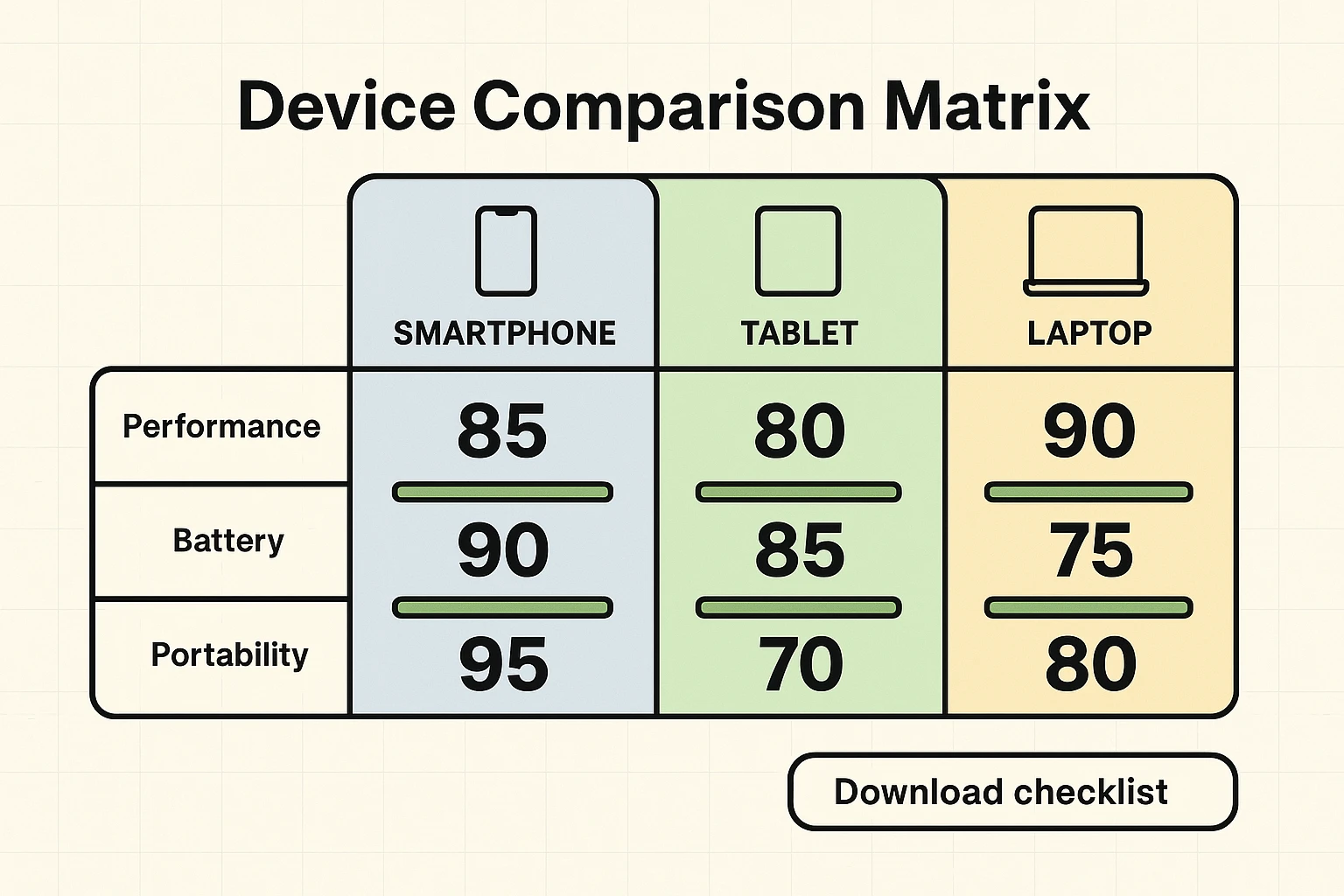
Side-by-side comparison matrix showing scores and progress bars for performance, battery, and portability to support final device selection.

One Size Fits None: Tailoring Your Tech to Your Life

The person who wants a laptop for writing their memoirs has very different needs from someone who wants a tablet for watching cooking shows in the kitchen. Let’s look at a few examples of how to prioritize.

  • The Social Grandparent: Your main goal is staying connected. You need a great camera for video calls and sharing photos, a big and bright screen, and a battery that won’t die mid-conversation. Performance can be average, but ease-of-use is king.
  • The On-the-Go Traveler: You need something light, durable, and with a battery that lasts all day and then some. A smaller tablet or a lightweight laptop is your best friend. A reliable connection (Wi-Fi and cellular) is more important than a massive screen.
  • The Creative Hobbyist: Whether you’re editing photos, writing, or learning a new skill online, you’ll want a device with a high-quality display and enough performance power to keep up with your creativity without sputtering. A comfortable keyboard or stylus support might be at the top of your list.
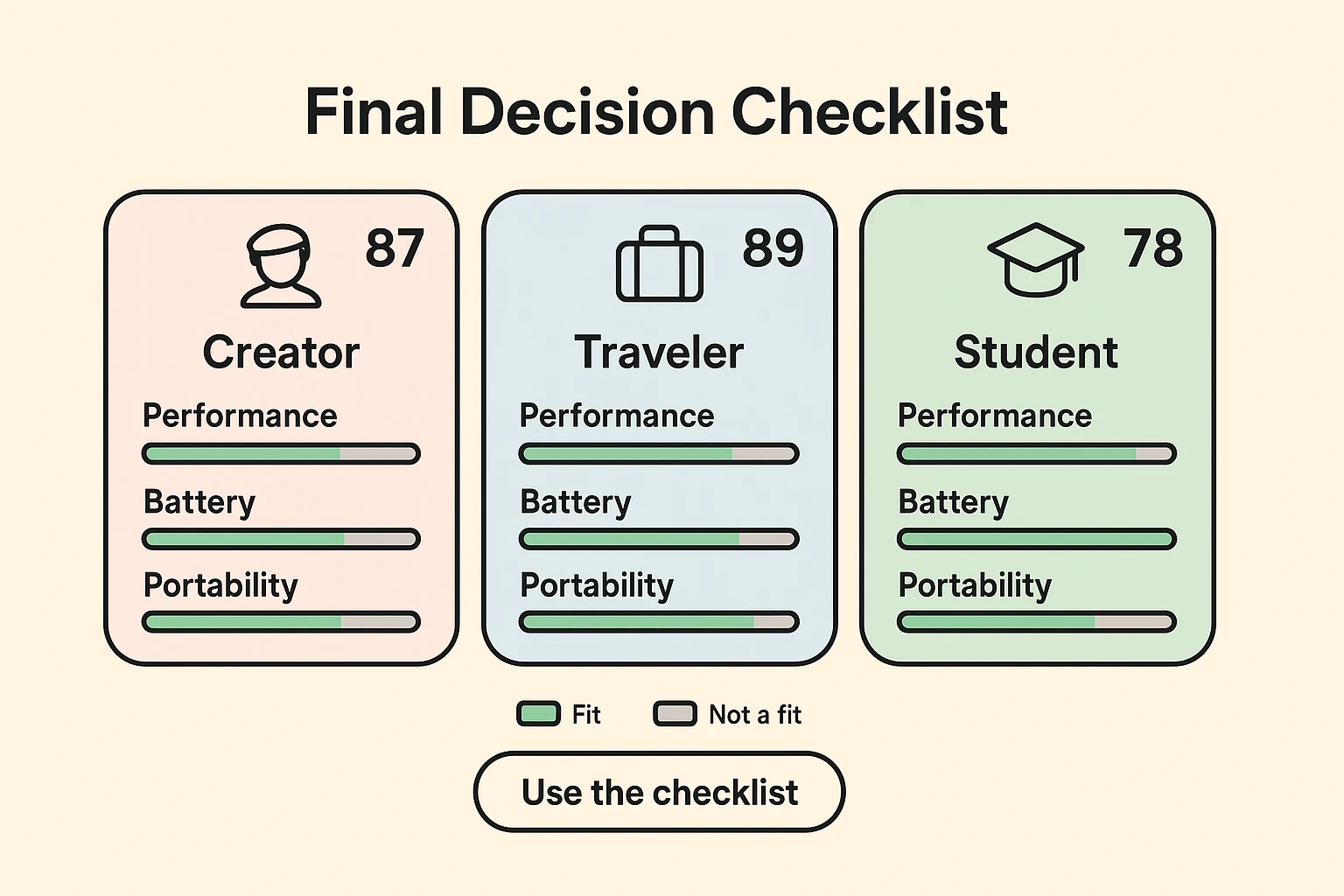
Persona-focused checklist cards with fit scores and progress bars to quickly identify which device best matches your priorities.

The Savvy Shopper’s Secret Weapon: When to Buy Refurbished

Okay, so you’ve narrowed down what you need. Now comes the price tag. Before you resign yourself to eating ramen for a month, let’s talk about one of the smartest trends in tech: buying refurbished.

This isn’t like buying a used car from a stranger on the internet. “Refurbished” means a device was returned, professionally inspected, repaired if needed, and certified to work like new. And you wouldn’t be alone in choosing this route. The global market for refurbished electronics is projected to hit nearly $130 billion by 2025, driven by eco-conscious and budget-aware consumers who know a good deal when they see one.

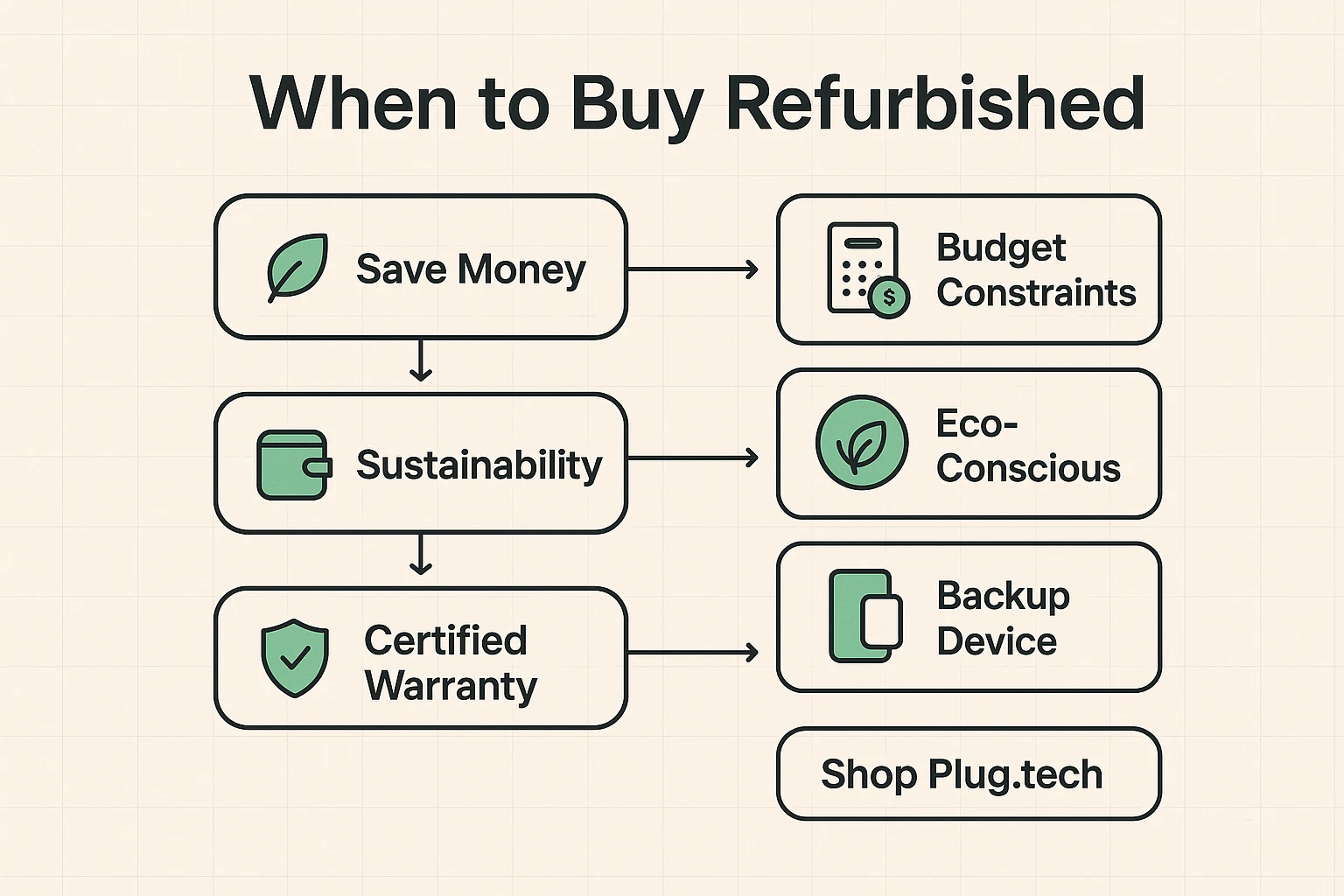
A clear decision flow that shows when refurbished makes sense — savings, sustainability, and certified warranty — with a direct path to Plug.tech.

Is Refurbished Right for You? The Pros and Cons

Buying refurbished is a brilliant move in many situations. It’s perfect if you want a high-end device like an iPhone or iPad without the jaw-dropping price, if you need a reliable second device, or if you simply want to make a more environmentally friendly choice.

The Pros:

  • Serious Cost Savings: You can often get a premium device for the price of a mid-range one.
  • Eco-Friendly: Buying refurbished keeps perfectly good electronics out of landfills.
  • Certified Quality: Reputable sellers test every function to ensure it meets factory standards.

The Cons:

  • Not the Absolute Latest: You might be getting last year’s model instead of the one that was just announced. (For most people, this makes no practical difference.)
  • Minor Blemishes: Some devices might have small cosmetic scuffs, but sellers are usually very clear about the condition.

Finding a Diamond in the Rough: Where to Buy Refurbished Tech You Can Trust

Here’s the most important rule: where you buy from matters more than anything. You want to buy from a certified refurbisher that provides clear information on the device’s condition, offers a solid warranty, and has a fair return policy. This is where trust becomes critical.

Big names like Apple and Best Buy have their own certified refurbished programs, which are excellent options. There are also dedicated marketplaces that specialize in this. One of the trusted sites we recommend is Plug.tech. They focus on providing certified, high-quality devices and are transparent about warranties and condition, which removes the anxiety from buying something that isn’t brand new in the box. The key is to look for those trust signals before you even think about clicking “buy.”

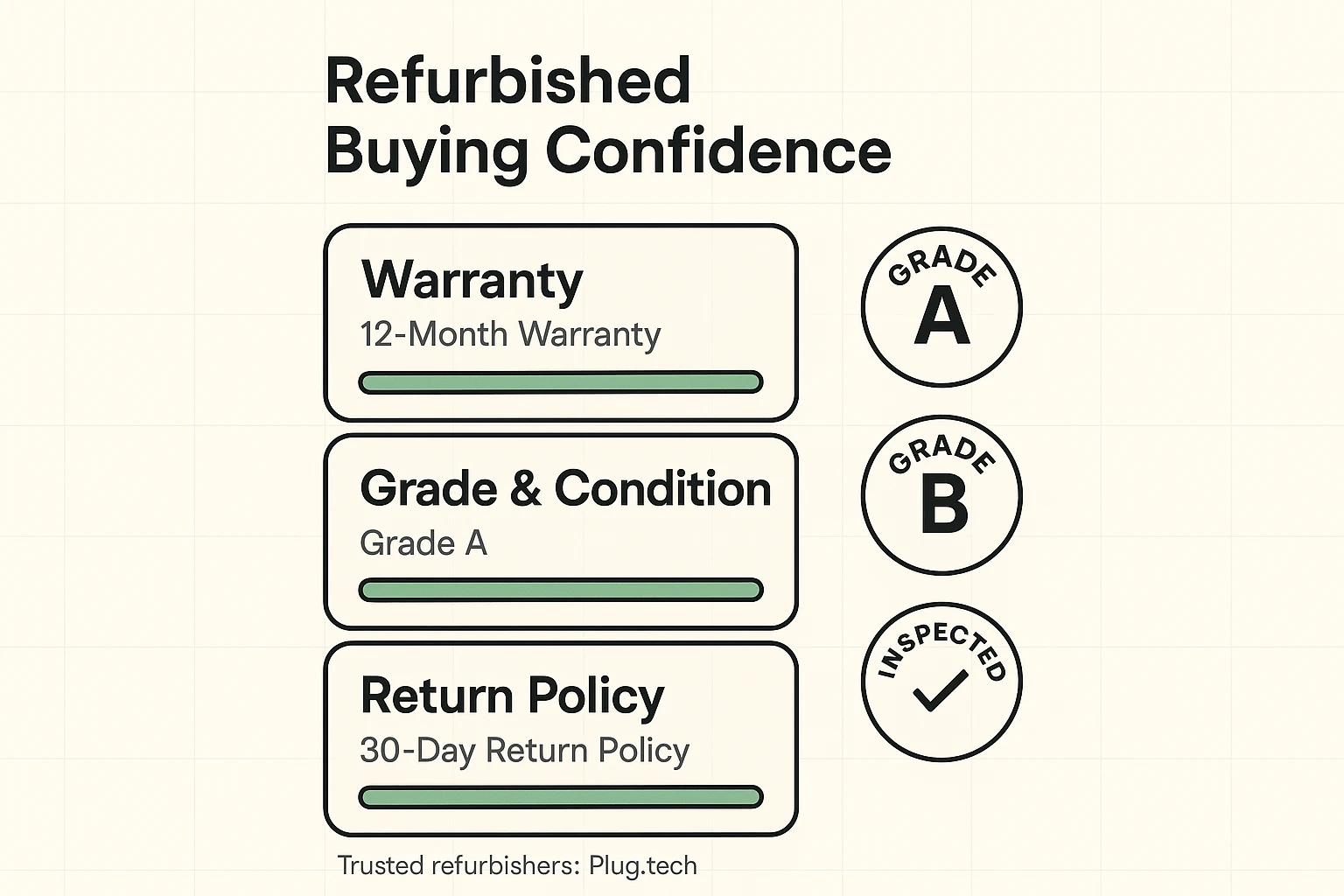
Trust-building visuals that highlight warranty lengths, condition grades, and return policies to reassure buyers of refurbished quality.

Your Top Tech-Buying Questions, Answered (FAQ)

Let’s clear up a few common worries that pop up when considering a refurbished device.

What does “certified refurbished” actually mean?

It means the device has gone through a rigorous, multi-point inspection. Technicians test everything—the battery, the camera, the speakers, the buttons—to make sure it all works perfectly. Any faulty parts are replaced, and the device is cleaned and reset.

What kind of warranty should I look for?

Never buy a refurbished device without a warranty. A reputable seller will offer at least a 90-day warranty, but many, including Plug.tech, offer a full year. This is your proof that they stand behind their product.

What if I get it and don’t like it?

A good seller will have a hassle-free return policy. Look for at least a 14 or 30-day window to send the device back for a full refund if it’s not what you expected.

Will the battery be any good?

This is a huge concern, especially with phones. Certified refurbishers test the battery to ensure it holds a sufficient charge (often 80% of its original capacity or more). If it doesn’t meet their standard, they replace it.

Your Final Decision Checklist

Ready to make your move? Here’s a quick-hitter checklist to guide you to the finish line.

  1. Define Your “Why”: What are the top 3-5 things you absolutely need this device to do? (e.g., video calls, browsing, watching movies).
  2. Set Your Budget: Know your comfortable spending limit before you start shopping.
  3. Compare 2-3 Contenders: Use the framework above to compare your top choices feature-for-feature.
  4. Check the Refurbished Option: Before buying new, see if you can get the same device—or a better one—from a trusted refurbished site like Plug.tech.
  5. Verify the Fine Print: Double-check the warranty and return policy. This is your safety net.

Choosing a new piece of technology doesn’t have to be a stressful ordeal. By focusing on your actual needs instead of flashy marketing, you can make a choice with confidence. And by considering a certified refurbished device, you can get the tech you want while keeping more money in your wallet. That’s not just smart shopping—it’s genius.

Newsletter Updates

Enter your email address below and subscribe to our newsletter

Leave a Reply

Your email address will not be published. Required fields are marked *


Stay informed and not overwhelmed, subscribe now!