
Newsletter Subscribe
Enter your email address below and subscribe to our newsletter


Smartwatches for seniors have come a long way… today’s devices do far more than tell time.
From automatic fall detection that calls for help if you take a tumble, to GPS tracking, heart rate monitoring, and medication reminders, the right smartwatch can genuinely support independence for older adults.
This guide covers the key benefits to look for, our top picks for seniors, and how to choose a watch that fits your lifestyle, whether you’re buying for yourself or for an aging parent. And if you’re weighing a smartwatch against everything else out there, our technology for seniors overview puts the options in one place.

What smartwatch features matter most for elderly people?
For older adults, the most important smartwatch features are automatic fall detection, GPS tracking, and an emergency SOS button — all of which are available on devices like the Apple Watch SE and Samsung Galaxy Watch. Fall detection automatically alerts emergency contacts if a hard fall is detected and the wearer doesn’t respond within 30 seconds.
Falls are the number one cause of injury for older adults… not a scary statistic pulled out of thin air, but a real everyday risk that sneaks up on the best of us.
One wrong step off a curb, one slippery bath mat, and suddenly you’re on the floor, wondering how long it’ll take for someone to notice you’re missing. That’s exactly the gap smartwatch fall detection was built to close.
Here’s how it works, minus the engineering degree. Your watch has two little sensors working together: an accelerometer, which senses sudden movement, and a gyroscope, which tracks your body’s position.
When the watch feels a hard impact followed by… nothing, no walking, no wrist movement, no pulse check, it puts two and two together and assumes you’ve taken a spill. After a short countdown (so it doesn’t panic every time you set your watch down a little too enthusiastically), it automatically calls your emergency contact or 911 and shares your location.
The good news is you’ve got real options here. Apple Watch Series 4 and newer, the Samsung Galaxy Watch, and the Garmin Venu Sq 2 all come with fall detection built right in.
Now for the honest catch, because we always give you the honest catch: this only works if you’re actually wearing the thing. A smartwatch charging on your nightstand is about as useful in an emergency as a life jacket in your closet.
Make it a habit, like putting on your glasses, and you already know how handy an Apple Watch can be for everyday tasks beyond safety, too.
For extra reassurance, pair your watch with Alexa Together for remote monitoring, adding another set of eyes and ears at home. For seniors, a smartwatch with fall detection provides peace of mind… for you and for the people who love you. If you’re in the market for one, you can browse smartwatch options here to see what fits your needs.
Think of your heart rate as your body’s own little weather report… it’s telling you something all day long, you just usually aren’t paying attention. A smartwatch changes that. It quietly checks in on your heart, your sleep, and your activity without you having to do a thing, which is about as close to having a nurse on your wrist as technology gets.
Most smartwatches today keep tabs on a handful of key health signals throughout the day and night:
None of this replaces your doctor… think of it more like a co-pilot than a pilot. The real value is in catching patterns. If your watch notices your resting heart rate creeping up over a few weeks, or flags an irregular rhythm during a quiet afternoon on the porch, that’s useful information to bring to your next appointment. Instead of trying to remember “I think I felt dizzy sometime last month,” you’ve got actual data.
You don’t need to become a health data scientist to benefit from this. Most watches summarize everything in plain, friendly language right on the screen or in the companion app. Glance at it in the morning with your coffee, the same way you’d check the weather before deciding on a jacket, and you’re already ahead of the game.
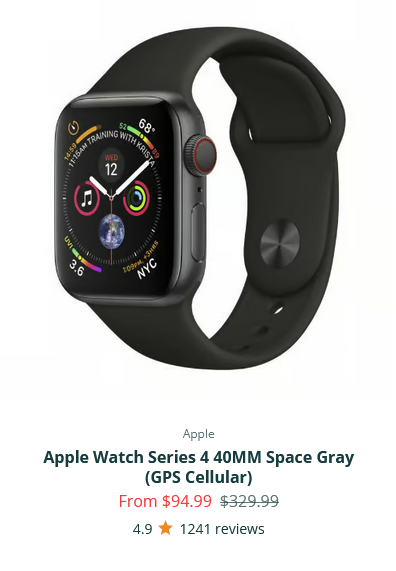
GPS on a smartwatch is a bit like a leash for grown-ups… except nobody’s holding the other end unless something goes wrong. That’s actually the beauty of it.
Who this helps most:
How it actually works:
A family member downloads a companion app, links it to the watch, and can check the wearer’s location anytime from their own phone. No calling around, no guessing, no driving the neighborhood at dusk hoping to spot a familiar coat. If Mom takes a longer walk than usual, you’ll know exactly where “longer than usual” led her.
The SOS button:
Most premium smartwatches also include a dedicated emergency SOS button. Here’s what it does:
Which watch to actually buy:
Either way, you’re not just buying a gadget. You’re buying yourself the ability to stop worrying quite so much, and that’s worth more than the price tag suggests.
Picking a smartwatch for an older adult isn’t like picking one for a teenager who just wants to track steps and look cool at the gym. The priorities are different: safety first, simplicity second, everything else a distant third. Here are our top four picks, and why each one earns its spot.
If your loved one already carries an iPhone, this is the easiest recommendation on the list.
Check current pricing and availability here.
For families in the Android world, this is the closest equivalent, with a few extra tricks up its sleeve.
See it in Plug Tech’s smartwatch lineup.
Think of this one as the marathon runner of the group… it just keeps going.
No apps to learn, no menus to hunt through.
Whichever one fits your family, the right watch is simply the one that’ll actually get worn every day.
Buying a smartwatch for your parent is a bit like buying shoes for a toddler… the fanciest pair means nothing if they refuse to wear it. So before you fall for flashy features, walk through this checklist together.
The best smartwatch isn’t the one with the longest feature list. It’s the one your parent will actually put on every single morning.
The Lively Wearable2 and the Apple Watch SE are both good options for tech beginners. The Lively is specifically designed for seniors with a simple interface and a built-in urgent response button. The Apple Watch SE is user-friendly if the senior already uses an iPhone.
Yes — Apple Watch, Samsung Galaxy Watch, and Garmin models can detect falls automatically using motion sensors. If a hard fall is detected and the wearer doesn’t respond within 30 seconds, the watch calls emergency services and sends a location alert to emergency contacts.
Yes — smartwatches with GPS allow family members to track a senior’s location through a companion app. This is especially useful for seniors with memory issues. Apple Watch uses Family Sharing; Samsung uses SmartThings. Both require a smartphone connection.
Not always. Apple Watch requires an iPhone, but Samsung, Garmin, and Fitbit smartwatches work with Android phones. Some dedicated senior watches like the Lively Wearable2 work independently with a cellular plan and don’t require any smartphone at all.
Smartwatches for seniors range from $100 to $400. The Apple Watch SE starts at $249, Samsung Galaxy Watch at $200, and budget options like Garmin Forerunner start around $150. Dedicated senior-focused devices like Lively start at $100 plus a monthly service plan.




I love this article. For most of my life I wore watches, and after over 40 years I realized that with a smartphone always with me I no longer needed to wear a watch. So I stopped. That worked until my wife got a Fitbit many years ago and started telling me how great they are.
She bought me one as a Christmas gift one year, and I have been hooked ever since. Now we both wear Apple watches. My primary use is for the fitness tracking and for my golf gps functionality. It’s great.
Appreciate the comment! Glad you both love your Apple watches!!
-Chris