
Newsletter Subscribe
Enter your email address below and subscribe to our newsletter


By Chris Clark, founder of Senior Tech Cafe
Online safety tips for seniors should make the decision easier, not turn you into a security researcher. Here’s the five-minute version.
Check the exact web address for misspellings. Search the business name alongside “scam” or “complaint.” Confirm the contact and return details elsewhere, not on the site itself. Compare reviews away from the seller’s page. Then look hard at the payment page before you type a card number.
That’s the whole routine. Five minutes, which is less time than you’ll spend deciding on the size.
If the seller is rushing you, wants to be paid in a way that can’t be reversed, or fails more than one of those checks, close the tab and buy it somewhere else. There’s always another store.
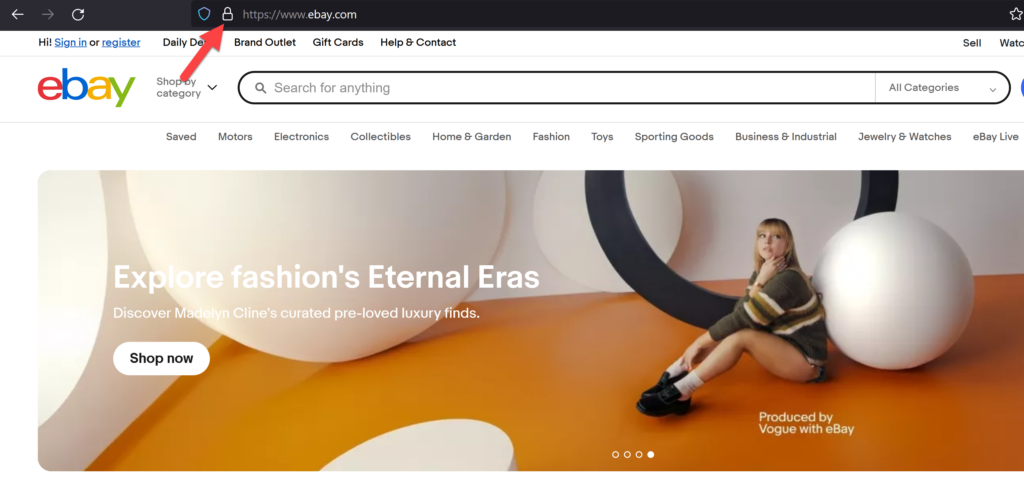
Read the address from right to left, stopping at the first single slash. Whatever sits just to the left of that slash is where you actually are. Everything after it is decoration the owner writes himself.
Then look for the substitutions that slide past a skimming eye. A zero standing in for the letter O. An extra word bolted on. A doubled letter. A familiar brand with an ending you’ve never seen it use.
A .com isn’t automatically safe, and a .biz or .info isn’t automatically a scam. The ending is the cheapest decision a website owner makes.
Now, the padlock, which causes more confusion than anything else on this page. HTTPS and that little padlock mean your connection is encrypted. That’s the entire promise.
It’s about privacy, not honesty. A thief can get a padlock as easily as a florist can, and for roughly the same price.
A certificate warning is a stop sign and should be treated as such. The absence of a warning isn’t permission to buy.
Checking a website’s content can help you determine if it is trustworthy. Consider the design and the quality of the writing.
Here are some tips to help you do this:
A legitimate website usually has a polished and professional look. Look for clean designs and organized layouts. Poor-quality graphics or mismatched fonts can be a sign of a scam.
Check if the website is easy to use. Good websites will have clear menus and all links will work properly. If the site looks outdated or cluttered, proceed with caution.
Be wary of an excessive number of ads or pop-ups. Legitimate sites will have ads, but too many might indicate that the site is not focusing on quality content.
Pay attention to spelling and grammar. A page full of errors still signals a lack of professionalism.
Clumsy writing is a weaker clue than it used to be, though. A scammer with an AI tool can produce clean, polished paragraphs in seconds, so good grammar earns a site no credit.
Check whether the information is detailed and useful. Vague or heavily promotional writing that never gets specific is the thing to watch for now.
A real store lets you find out three things without much effort: who’s selling, how returns work, and what the total will actually be.
If any one of those is hard to find, that’s your answer.
Search the listed address and phone number outside the site. Read the return policy for the window, the restocking fee, who pays return shipping, and where things go back to. “Contact us for returns” is not a return policy.
Then, at checkout, confirm the web address hasn’t changed and the total matches what was advertised.
Pay by credit card when you can, since credit cards generally give you stronger dispute rights than debit cards.
And leave immediately if the only ways to pay are gift cards, cryptocurrency, a wire transfer, or a personal payment-app transfer. Every one of those is designed to travel in one direction.
Our safe online shopping tips go further into paying safely and choosing where to buy.
Search the business name, the domain, and the product name across a few independent sources.
Look for specific experiences rather than a star average. Delivery, returns, refunds, what happened when somebody complained. One review describing a refund that took eleven weeks tells you more than a page of perfect fives.
Read the newest reviews and the worst ones. Open reviewer histories where you can. Watch for bursts of near-identical praise arriving on the same day.
A brand-new business can be perfectly honest and simply have no history yet, so don’t treat reputation as the verdict on its own.
Combine it with the address, the contact details, the policy and the payment options, then see whether the whole picture holds together.
That last one is quietly useful. An account that posts regularly and answers annoyed customers in public is behaving like a real business… an account with nine followers and one post from 2023 is a stage prop.
Reviews written by software now read perfectly well, so flawless English proves nothing anymore. Once you learn to spot AI-generated stores and reviews, a glowing wall of five stars stops being persuasive.
Look for the boring reviews instead. The ones naming a specific product, a specific problem, and how the company handled it are the ones doing real work.
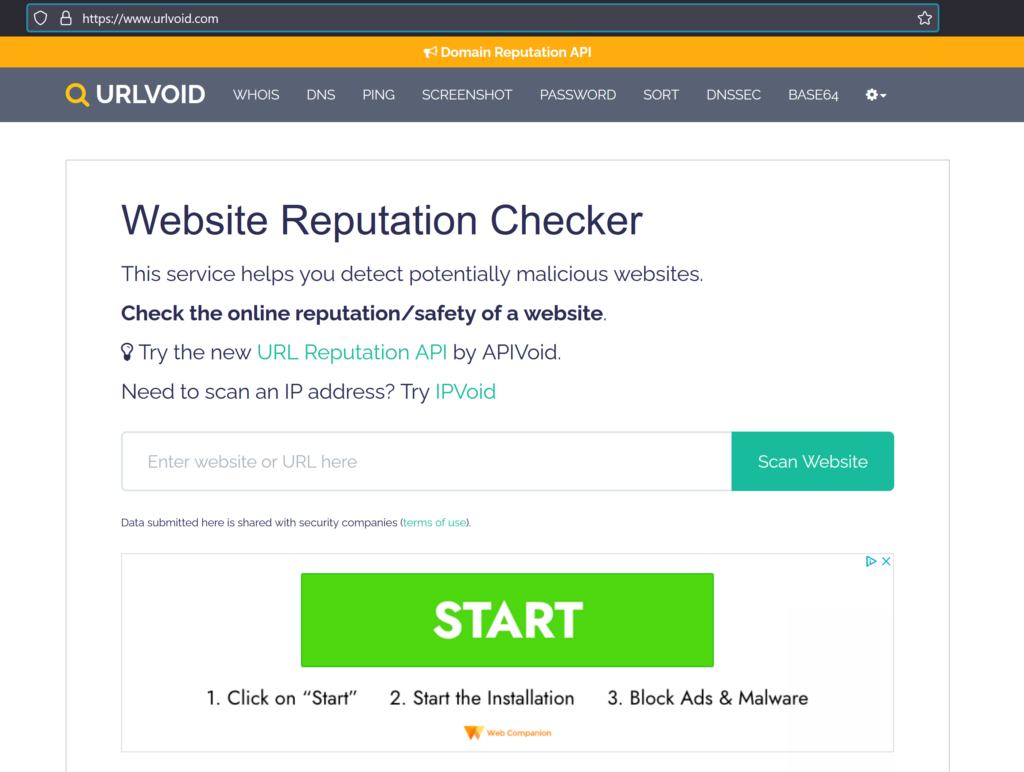
Two free tools do most of the work here, and both take about thirty seconds.
Paste the address into Google Safe Browsing’s Site Status tool. It tells you whether that site has already been caught doing something dangerous.
Then check the registration record through ICANN Lookup, which tells you when the domain was created. A site selling discount hearing aids that came into existence eleven days ago has earned a second look.
A clean result from either one means nobody has reported a problem yet. That’s a clean record, not a character reference.
One warning about browser extensions. Every article on the internet wants you to install something, and a fair number earn a commission when you do.
Your browser already blocks known dangerous sites, as long as you keep it updated. If you do want more protection, download it from the publisher’s own website, never from a pop-up or an ad.
Print this one and keep it where you’ll see it.
Run through the list before you pay. Every time, including on the sites you think you already know.
☐ The domain is spelled exactly as expected.
☐ The browser shows no certificate or malware warning.
☐ The business address and phone number match independent sources.
☐ Return and refund terms are specific and reasonable.
☐ Reviews come from more than the seller’s own page.
☐ The price is believable compared with other sellers.
☐ The checkout domain and total are correct.
☐ Payment does not require gift cards, cryptocurrency, a wire, or a personal transfer.
Eight looks. Then decide.
If two or more checks fail, stop. Save the address and ask someone you trust for a second opinion. No explanation owed.
If you have already paid, save everything before it disappears. Screenshots, receipts, emails, and the exact web address.
Call your card issuer or bank at a number you’ve verified. Use the one printed on your card, not the one on the website.
Ask about blocking the card and disputing the transaction.
Report the site at reportfraud.ftc.gov. If personal information was exposed, identitytheft.gov will build you a recovery plan.
You can also report a dangerous page to Google Safe Browsing through its official reporting form, which helps whoever lands on it next.
Don’t contact a recovery service that asks for payment up front. That’s the second scam, and it’s aimed squarely at people who’ve already lost money once.
Take these in order. And ask someone you trust to sit with you while you do it, because the phone calls are tedious and it helps to have company.
That last step is the one people skip, and it is the one that helps most. Saying it out loud ends the private spiral where you talk yourself into waiting a few days.
One more thing, and it matters more than the rest of this page. Being scammed says nothing about your judgment, and it happens to attorneys, engineers, and people who build websites for a living.
For the wider picture, our online safety guide for seniors pulls scams, privacy, and security together in one place.
Check the exact domain, verify the business and contact details somewhere other than the site, read the return terms, compare reviews across several sources, look at the checkout address and total, and avoid payment methods that can’t be reversed. No single check settles it. Two failures usually do.
No. HTTPS encrypts what travels between your browser and the website, and scammers can obtain certificates as easily as anyone else. The padlock tells you the conversation is private. It tells you nothing whatsoever about who’s listening at the other end of it.
No. Any ending can belong to a real business or to a scammer, because the ending is the cheapest decision a website owner makes. Judge the exact address alongside the business details, the reputation, the policies, the claims, and the payment options. The .com by itself tells you nothing.
Save the evidence, then call your card issuer or bank on a number you’ve verified and ask about disputing the charge. Change any password you reused elsewhere. Report it at ReportFraud.ftc.gov, and use IdentityTheft.gov if identity information was exposed. Take them in order, and you don’t have to do it alone.







Can u provide more comprehensive advice on how to use my computer more effectively
I replied to the email you sent about this, Monica. Look forward to hearing back from you 🙂
Chris