Newsletter Subscribe
Enter your email address below and subscribe to our newsletter


Have you ever had that specific, heart-in-your-throat moment? The phone rings, you see it’s your parent, but you miss the call. You call back. No answer. You try again five minutes later. Still nothing. Suddenly, your brain’s emergency broadcast system kicks in, painting vivid, catastrophic scenarios involving throw rugs, slippery floors, and the family cat plotting a hostile takeover.
That low-level, background hum of worry is something many adult children of independent seniors know all too well. We want our loved ones to have their freedom, but we’d also kind of like to wrap them in bubble wrap from the waist down. It’s a pickle.
Enter the latest buzzword from the land of technology: AI Fall Detection. It sounds like something out of a sci-fi movie, possibly involving robots and a suspiciously calm computer voice. But in reality, it’s one of the most practical tools around for providing both safety for seniors and a giant, collective sigh of relief for their families. Let’s pull back the curtain on this technology, separate the helpful from the hype, and figure out what it all means—no engineering degree required.

At its core, an AI fall detection system is like a silent, ever-watchful lifeguard for the living room. It uses sensors to monitor movement, and a very clever computer brain (the “AI” part) to figure out the difference between someone sitting down dramatically and someone actually falling.
Think of it this way: You can trip and catch yourself. You can flop onto the couch. You can kneel to find the TV remote that the dog hid again. The AI is trained to ignore all that normal stuff. It’s looking for the specific signature of a fall—a sudden, uncontrolled change in height and velocity that says, “Uh oh, gravity won.”
When it detects what it believes is a fall, it kicks into action, typically by sending an alert to a 24/7 monitoring center or directly to a family member’s phone. It’s not about preventing the fall itself; it’s about ensuring that if one happens, help is on the way in minutes, not hours.
Before we go further, let’s clear the air. Technology, especially “AI,” comes with a lot of baggage and misunderstandings. Let’s tackle the big ones.
This is the most common mistake. These systems are a rapid response tool, not a prevention tool. They don’t make floors less slippery or rugs less trippy. Think of it like a smoke detector: it doesn’t stop a fire from starting, but it screams its head off to get you out safely when one does.
While they are remarkably good, they are not perfect. Sometimes, a person dropping heavily into a recliner can trigger a “false alarm.” On the other hand, a slow slide down a wall might not be detected. The goal of these systems is to catch the vast majority of dangerous falls, and they do that very well.
Not at all. A fall can happen to anyone at any age. For an active senior living alone, a detection system is like a seatbelt—you hope you never need it, but it provides incredible peace of mind just by being there. It’s a tool for maintaining independence, not a sign of losing it.
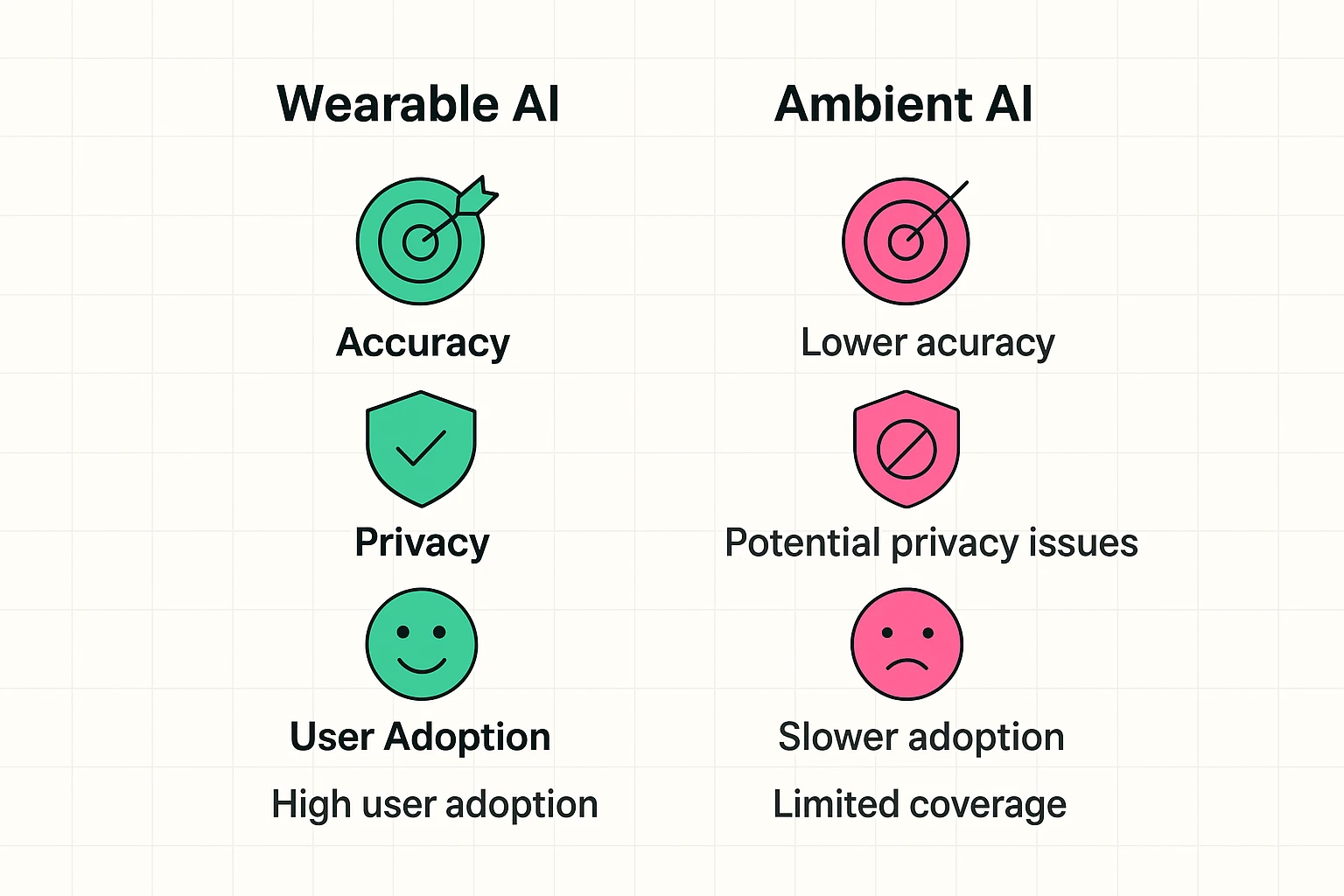
Fall detection systems generally come in two flavors: things you wear, and things you install in your home. Each has its own fan club and its own set of quirks.
These are the pendants, necklaces, and smartwatches you’ve probably seen advertised. They contain a tiny sensor called an accelerometer (the same doodad that turns your phone screen when you rotate it) that feels for a sudden jolt and change in orientation.
These are sensors you place around the home. They don’t require the senior to wear anything. There are a few kinds:
Camera-Based AI: A camera watches for the shape of a person and analyzes their movements.
Thermal or Radar AI: These systems don’t see you in detail; they see a heat signature or a radar outline. This is a huge plus for privacy, especially in places like a bathroom or bedroom.
Pros: They are always on and require zero effort from the user. You can’t forget to “wear” your living room.
Cons: They only work in the rooms where they’re installed, and the idea of a sensor in the bathroom can raise some legitimate privacy questions.
Feeling a little overwhelmed by the options? Don’t be. Choosing the right system isn’t about picking the one with the most futuristic-sounding name. It’s about matching the technology to a real person’s life.
Is your loved one a homebody whose biggest trip is from the kitchen to the den? Or are they an avid gardener, walker, and social butterfly? The answer will quickly tell you if you need whole-home coverage or something portable.
This is a big one. For ambient sensors, you need to discuss comfort levels. A thermal sensor that just sees a heat blob is very different from a high-definition camera. Be open and honest about what feels right.
Look beyond the price of the device itself. Most systems have a monthly monitoring fee. Ask about installation costs, activation fees, and cancellation policies. Get the full financial picture before you commit.
What happens when an alert is triggered? Does it call a professional monitoring service? Does it text three family members? Make sure the protocol is clear and works for your family.
Bringing up a fall detector can feel like you’re saying, “I don’t think you can take care of yourself.” Frame it as a tool for empowerment. It’s what allows them to continue living independently with an extra layer of security, giving everyone peace of mind.
Reputable services will almost always try to establish two-way communication first. A voice will come through the base station or pendant asking if you’re okay. You can simply say, “I’m fine, false alarm!” and they will cancel the dispatch.
Generally, Original Medicare (Part A and Part B) does not cover medical alert systems. However, some Medicare Advantage (Part C) plans may offer it as a supplemental benefit. It’s essential to check with your specific plan provider.
Most modern systems are designed for plug-and-play simplicity. Typically, you plug a base station into a power outlet and a phone jack, and the wearable device is ready to go. Ambient sensors might require a bit more installation, but many are designed for easy, tool-free placement.
Most high-quality systems have a battery backup for the base station that can last for 24-72 hours. Many also connect via a cellular network, so they don’t even need a landline or home internet to function.
Choosing a fall detection system isn’t just another tech decision. It’s a conversation about safety, independence, and dignity. It’s a tool that can quiet that nagging worry in the back of your mind and empower a senior to live in their own home with confidence.
By understanding how these systems work and what to look for, you can make a choice that fits your family’s unique needs. As you continue exploring ways to make life safer and simpler, you’ll find a wealth of straightforward advice right here at the senior tech cafe.