Newsletter Subscribe
Enter your email address below and subscribe to our newsletter


By Chris Clark, founder of Senior Tech Cafe
Here’s how to blur your house on Google Maps: open your home in Street View, click Report a problem in the bottom-right corner, choose My home, and upload proof that you live there. Google reviews the request, and once it blurs your house, the blur is permanent.
Remember the good old days when the only way someone could see your house was by physically driving by it? Times have changed.

Now anyone with an internet connection can take a virtual stroll down your street and admire your prized petunias, or worse, case your joint for a burglary.
So here’s how to become the Harry Houdini of the internet and make your house disappear from Google Maps. (Well, go blurry. Even Houdini had limits.)
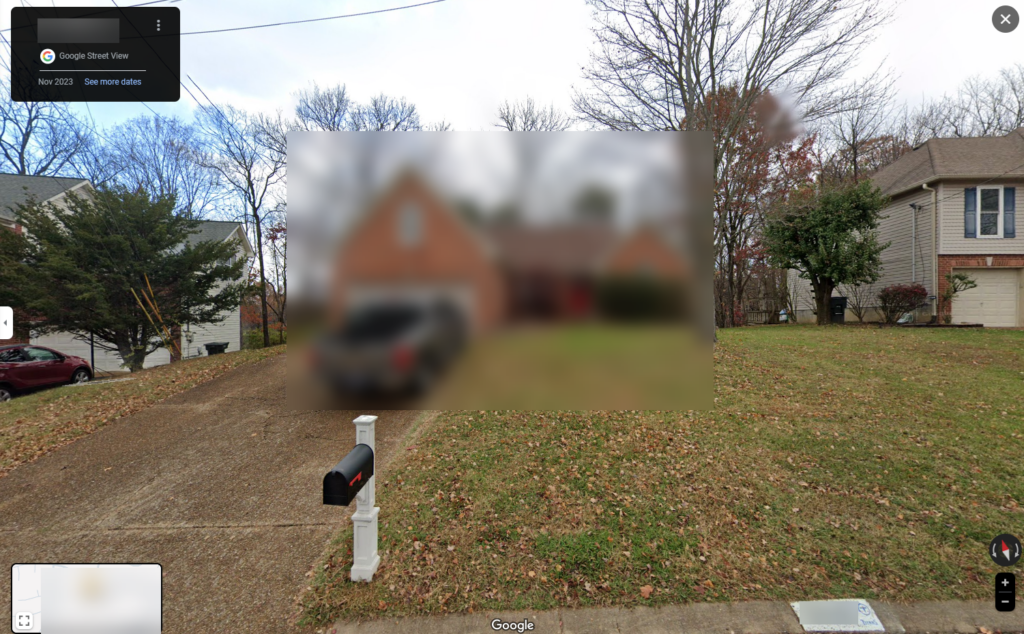
Google Maps has two kinds of pictures of your house. The satellite view shows your roof from above. Street View is the 360-degree photos taken by Google’s camera cars, which show your front door, windows, driveway and whatever’s parked in it. It’s like having the whole world at your fingertips, minus the jet lag and overpriced airport sandwiches.
Street View is the part you can blur. It’s also the part that feels a little too invasive when you realize anyone can look at your front porch just by typing in your address.
Now, you might be thinking, “Why on earth would I want to hide my beautiful home from the world?” It’s not just about modesty (although we all know your garden gnome collection is the envy of the neighborhood). Here are the three main reasons people do it:
Blurring won’t hide your address or stop anyone driving past. It just stops your house being a click away from a close-up.
To blur your house on Google Maps, you send Google a blur request from the Street View image of your home, along with proof that you own or rent it. Only the owner or a tenant can ask. Google says the request works from the Maps app too, but it’s easiest on a computer, where the picture is bigger.
Tech companies love rearranging things. If a button below has moved, let us know so we can update this for everyone.
Google doesn’t say how long a review takes, only that it works through requests as fast as it can. Once your blur is applied, it’s permanent.
Google wants one document showing you live at the address. Any of these works:
It has to be a photo, scan or PDF (PNG, JPG or PDF) under 10 MB. No handwritten documents, and no driver’s license or other government ID.
Google asks you to black out your name and account numbers first, so it only sees the address. Do that properly: a black box drawn over a PDF can still be read underneath. Our guide on how to redact a document shows the safe way, or print the bill, use a thick marker and photograph it. Google says it deletes the documents after 60 days.
No. You can’t remove your house from Google Maps. Your address, the pin on the map and the satellite view of your roof all stay, and Google doesn’t blur satellite or aerial pictures. A Street View blur is the only privacy tool Google offers for a home.
Two related things you can do:
Remember, once your home is blurred, it stays that way. If you ever sell your house, potential buyers will have to use their imagination or actually visit in person. How quaint.
A blur also only covers Google. Real estate websites can keep old listing photos of your home, and people-search sites publish addresses for anyone to look up. Our guide to removing your information from data brokers deals with the second one, and we’ve got a guide to removing location from your photos so your pictures don’t give your address away either. For the rest, start with our online safety guide for seniors.
Just remember: your house might be hidden on Google Maps, but your neighbors can still see you dancing in your living room. Some things are better left unblurred.
Google doesn’t give a timeframe. Its help page says only that it reviews reports as fast as it can. Check your house in Street View every week or two. If nothing has changed after a month or so, send the request again, making sure your proof of address is clear and recent.
No. Google says that once it applies a blur request, the blur is permanent. That holds even if you change your mind or sell the house, and a new owner can’t undo it either. If you’re planning to sell soon, you might wait until after the sale and leave the decision to the buyer.
No. Google says it doesn’t blur satellite or aerial imagery, so the view of your roof from above stays as it is. The blur covers the street-level Street View photos, which are the ones that show your front door, windows, car and yard in close-up detail. Those are what most people want hidden.
Yes. Apple Maps has its own street-level photos, called Look Around. Apple asks you to email MapsImageCollection@apple.com with your address and a request to blur your house. Apple already blurs faces and license plates automatically, but it blurs a house only when someone asks.